Layer (Image Editing)
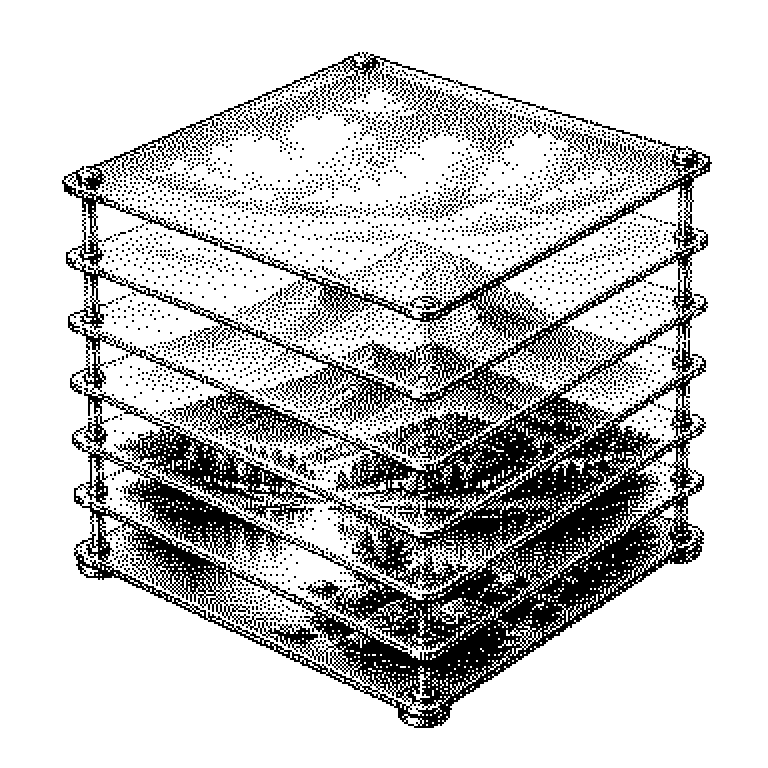
A layer is a transparent sheet in an image editing program on which part of the image sits. Because the sheets are stacked on top of each other, each part can be changed individually without damaging the rest.
Imagine several transparent sheets of film lying exactly on top of one another. On the bottom one there’s a photo, on the next one text, and on the top one a logo. Viewed from above, all three together look like a single image. This is exactly how programs like Photoshop, GIMP, or Canva work: each sheet there is called a layer. If you move the text, the photo underneath remains completely untouched. Without layers, everything would be merged into a single grid of colored pixels, and every change would overwrite whatever was previously in that spot.
Why professionals never paint on a single surface
The most important advantage is reversibility. As long as an element sits on its own layer, you can move it, shrink it, fade it, or delete it at any time. The background underneath was never gone, it was just hidden. This way of working is called non-destructive, because the original pixels are preserved.
This is also practical when several people work on one file. A designer builds the layout, someone else later just swaps out the text. In advertising, the same templates are used for many languages: the image stays, the text layer gets replaced. If everything were merged, the image would have to be rebuilt every time.
A common misconception: layers don’t make the image file prettier, just easier to edit. Anyone who puts an image online usually saves it as JPEG or PNG, and in doing so all layers are flattened into a single surface. That’s why professionals always additionally keep the working file with all layers, for example in PSD or XCF format.
Stacking order, opacity, and masks
Three settings determine what you see in the end. First, the order in the stack: whatever sits on top covers whatever lies beneath. Second, the opacity, meaning how transparent a layer is. At 100 percent it covers completely, at 30 percent the background shows through.
Third, the blend mode. It determines how the colors of two layers are combined with each other. The “Multiply” mode makes the result darker, “Screen” makes it lighter. This creates shadows or light effects without ever picking up a brush.
Also very important are layer masks. A mask is a grayscale stencil that determines which parts of a layer are visible. White means visible, black means hidden, gray means half transparent. So you’re not erasing anything, just hiding it. Paint the mask white again, and the image part is back.
There are also layers that don’t contain an image themselves. An adjustment layer only stores an instruction, for example “make everything underneath more contrasty.” This too can be switched off later.
From the phone app to the AI image generator
Layers show up everywhere images are designed. Presentation programs stack text boxes and graphics according to the same principle. Video editing programs call their tracks something similar, and in map apps you can toggle on layers like traffic or satellite imagery. Even stickers in a story app are basically layers on top of the photo.
In tech news, layers now come up in connection with AI. Image generators normally deliver a single flat image. A current selling point among providers is therefore to output results directly in separate layers. Then the background sits separately from the foreground, and a human can touch it up.
The well-known one-click background removal tools work similarly. The AI recognizes the subject and generates a mask from it on a layer. The result is the same structure that image editors have been building by hand for decades. So whoever understands what a layer is also understands what such tools are really doing.